Documentation · Signals and insight
Group finder
The open Planning Center groups that fit each person, on their page and their next step, and the groups worth launching where nothing near fits.
For: PastorAdminOwner
See this screen in the demo church
What it reads
From Planning Center, once every few hours, each group's:
- Name, type and tags. They say who a group is for: students, young adults, families, couples, empty nesters or seniors, and men or women. Tags in a tag group named for an area ("Area", "Region", "Neighborhood", "Campus") name where it meets.
- Schedule. The day, and whether it falls on a Sunday morning, a weeknight or a weekday.
- Location. The town it meets in, or online.
- Enrollment. Whether it takes new people, and how many spots are left when it has a limit.
Who is in a group is never read for this.
About each person, GiftWell uses what it already holds:
- Life stage, worked out from their Planning Center age band and household: someone with a child at home is in the families' stage, someone 18 to 34 is a young adult, and so on. It is never asked and never shown as a label on anyone.
- Gender, only so men's and women's groups go to who they are for.
- The town they live in, from their Planning Center address. Only the town is kept, never the street.
- When they are free, from the assessment, if they shared it with the team.
- Their lead gifts: a Bible study draws on Teaching, a dinner group on Hospitality, a care group on Mercy.
How a group fits
A group is left out when it is full or closed, when they are already in it, or when it is for someone else: a men's group for a woman, a seniors' group for a young adult. Students' groups go only to people under 18, and people under 18 are offered only students' groups. Nothing is suggested to a child.
The rest are ordered by:
- Near them: in their town, or online.
- Their stage of life.
- A time they said they are free.
- A gift it draws on.
Each group shows why it fits as small badges: the day, near them or online, who it is for, the gift and the spots left.
Where it shows
- A person's page. When their next step is joining a group, the three that fit best sit under it. Groups that fit on the Path tab lists up to five for anyone in no group yet. Each links to the group's Church Center page.
- People. The Group filter finds who is in no group, and who has an open group that fits. A small badge beside their stage counts the groups that fit; hover it for their names.
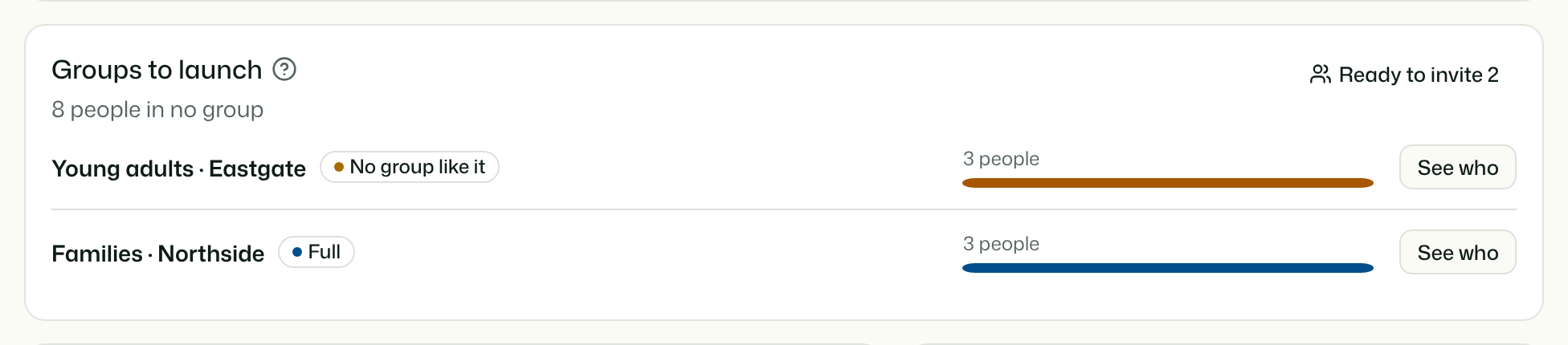
- The Overview, for pastors and up: Groups to launch.
Groups to launch
Everyone in no group is counted once:
- Ready to invite: an open group near them fits. The button opens People with just them.
- Everyone else is grouped by life stage and town. Where three or more people share one, the card shows them:
- No group like it: nothing for that stage meets near them.
- Full: groups like it meet near them but are full or closed. Opening a spot may be enough.
See who opens People with the people in that row.
Who sees what
- Pastors, admins and owners see groups to launch. Anyone who can open a person's page sees the groups that fit them.
- The Overview card is counts only. Names appear only on People.
- Nothing here contacts anyone or writes to Planning Center. Inviting someone, and adding them to a group, stays with your team. Planning Center tells GiftWell when they join, and the pathway step counts it.
- GiftWell needs Planning Center connected with Groups. Without it, the finder doesn't show.
- AI agents and Ask AI can use the same finder with find-groups (pastors and up): for one person, or groups to launch as counts.
Try it on your own church
Your assessment link works the minute you sign up. The first 50 people are free, and there is no card to enter.
This page as Markdown, for notes or an AI assistant.